


 "
"


While we discussed some big ones such as Wave extensions and its wiki-like interface, the feature that we said “may be the most important aspect of Google Wave” was its open-source nature.
Not only did Google promise to let developers improve the code, but they promised federation for Wave, meaning that anyone could take the Wave code and run their own private or public wave server. Today, Google took the first step towards the full federation of its real-time communication platform by announcing that the developer sandbox version of Google Wave is open for experimental federation.
Let’s be clear: this is a very early stage test of federating the Google Wave code onto non-Google servers. It only affects the developer sandbox, meaning that the preview version of Wave that most people are using is not a part of this test. However, it is a big step in making it a widespread product, rather than only a tool of early adopters. Businesses and individuals can begin testing their own local copy of Wave. This is just the beginning of Google’s legitimate attempt to upend email as the standard for web correspondence and communication.
If you’re a developer with a sandbox account and want to get started, Google has published some installation instructions for a Java version. Be warned though: there will be a lot of changes occurring over the next few weeks, many of them based on developer feedback.
- Testing Google Wave: This Thing is Tidal- The Top 6 Game-Changing Features of Google Wave
- Google Wave: 5 Ways It Could Change the Web
- Google Wave Extensions: An Inside Look
- Could Google Wave Redefine Email and Web Communication?
Tags: Federation, Google, Google Wave, Google Wave Federation


(Note: This is my personal opinion and doesn’t reflect Mozilla’s official position nor any formal statement from Mozilla)
In my post on October 15, I wrote about the European Commission (EC)’s investigation of Microsoft due to its bundling of Internet Explorer (IE) with Windows, which the EC viewed as potentially harming consumer choice and innovation on the web. Microsoft, to appease the EC, proposed that Windows users be presented with a ballot in which they could choose which browser to install. I said at the time, and in a subsequent post, that creating a ballot would not successfully address the EC’s concerns nor provide a good experience to users. However, since the EC seems to be giving Microsoft the go-ahead to design a ballot, it seems that the best we can do is consider how to design a ballot that causes the least amount of harm to users.
Here are two broad principles that are important in ballot design.
A ballot should present the voter with the information they need to make an informed choice, but no more. The verbal and graphic language on the ballot should be organized so that readers follow a consistent path through the ballot’s information. Many viewing the browser ballot will not be familiar with the browser as a separable element from the operating system, so clear and precise language is vital.
In interaction design, the complexity of a new task can be lessened by leveraging against what the user already knows and expects. For instance, it’s usually best to display the instructions in the top left for western readers, and before the the possible ballot choices (Kimball and Kropf 2002). It is also recommended that the instructions be as close to the first task as possible, because it provides the highest chance that voters will read them (Dillman and Christian 2002 (pdf)).
Other recommendations to make a ballot simple and clear include:
I wrote in my previous post about how ballot order can influence voters. Another important factor is how much physical space on the ballot each item is designated.
The current design runs into some problems with designated space per item, swayed in favor of IE. For instance, in the current design:
The current space allocation for IE is roughly 3.35 times as much as the other browsers.
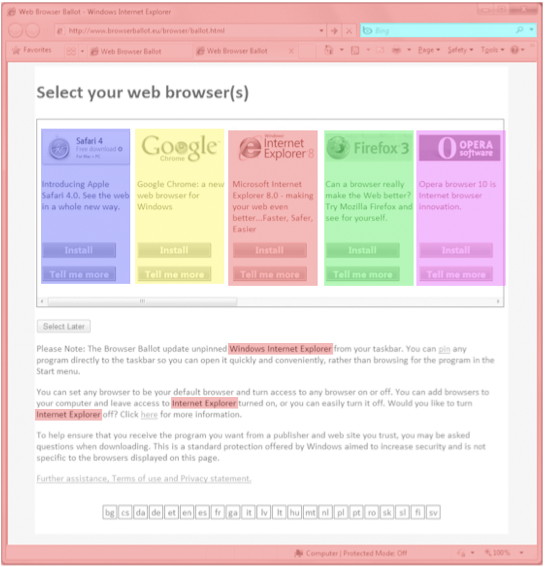
Current ballot: 3.35 times more space given to IE than the other browsers

Allocation of visual space for each ballot choice
This space that IE occupies in the top left of the ballot is particularly important because it’s where users begin an eye scan of a new page. As an anonymous source pointed out to me, Microsoft mentions this in their layout guidelines:
“All things being equal, users first look in the upper left corner of a window, scan across the page, and end their scan in the lower right corner. They tend to ignore the lower left corner.But in interactive UI, not all things are equal so different UI elements receive different levels of attention. Users tend to look at interactive controls—especially controls in the upper left and center of the window—and prominent text first”
In summary, the ballot would be improved by being simpler, clearer, and be presented with equal weight to each browser.
Here’s a version similar to the current proposal but with these principles in mind:


 ,
, (this is the native GTK+ version available with GTK+ 2.18 and later only, with earlier GTK+ it would looks similarly to the other platforms, notably it would show icons and position the buttons horizontally -- I have no idea why does the native implementation stack them vertically which looks rather ugly IMO) and

Read more of this story at Slashdot.
 "
"
AirFM is a beautiful Adobe Air app that contains around 200 radio stations from all around the world. It has a simple yet eye-candy interface with three main tabs on top, Radio Stations, Radio Player, and Favorites.
Once you start, click Radio stations tab, select any one of the neatly listed categories, and then play the desired radio station. You can also favorite any radio station and they will be added under Favorites tab.


The Radio Player allows you to increase/decrease volume and switch between next and previous radio stations.

At the moment it is in beta and the developer is adding one more feature before releasing the first version to the public. The new feature will be able to tell the total time spend on each radio station. If you want any additional features, don’t hesitate to contact the developer.
Since it is build on Adobe Air it is a cross-platform tool, i.e, it works on Windows, Linux, and Mac. Enjoy!
"
Read more of this story at Slashdot.
 "
"
Compleat is an easy, declarative way to add smart tab completion for
any command. It's written in Haskell (but requires no programming knowledge).
See the GitHub repository for a quick description, or read on for a
complete explanation.
I'm one of those programmers who loves to carefully tailor my development
environment. I do nearly all of my work at the shell or in a text editor,
and I've spent a dozen years learning and customizing them to work more
quickly and easily.
Most experienced shell users know about programmable completion, which provides
smart tab-completion for for supported programs like ssh and git. You can
also add your own completions for programs that aren't supported—but in
my experience, most users never bother.
At Amazon, everyone used Zsh (which has a very powerful but especially baroque
completion system) and shared the completion scripts they wrote for our myriad
internal tools. Now that I'm in a startup with few other command line
die-hards, I'm on my own when it comes to extending my shell.
So I read the fine manual and started writing completions. You can see the
script I made for three commands from the Google Android SDK. It's 200
lines of shell code, and fairly straightforward if you happen to be familiar
with the Bash completion API. But as I cranked out more and more case
statements, I felt there must be a better way...
It's not hard to describe the usage of a typical command-line program.
There's even a semi-standard format for it, used in man pages and generated by
libraries like AutoOpt. For example, here's the usage for android, one
of the SDK commands supported by my script:
 android [--silent | --verbose]
  ( list [avd|target]
  | create avd ( --target <target> | --name <name> | --skin <name>
               | --path <file> | --sdcard <file> | --force ) ...
  | move avd (--name <avd> | --rename <new> | --path <file>) ...
  | (delete|update) avd --name <avd>

  | create project ( (--package|--name|--activity|--path) <val>
                   | --target <target> ) ...
  | update project ((--name|--path) <val> | --target <target>) ...
  | update adb )
My idea: What if you could teach the shell to complete a program's arguments
just by writing a usage description like this one?
With Compleat, you can add completion for any command just by writing a
usage description and saving it in a configuration folder. The ten-line
description of the android command above generates the same results as my
76-line bash function, and it's so much easier to write and understand!
The syntax should be familiar to long-time Unix users. Optional arguments are
enclosed in square brackets; alternate choices are separated by vertical
pipes. An ellipsis following an item means it may be repeated, and
parentheses group several items into one. Words in angle brackets are
parameters for the user to fill in.
Let's look at some more features of the usage format. For programs with
complicated arguments, it can be useful to break them down further. You can
place alternate usages on their own lines separated by semicolons, like this:
android <opts> list [avd|target];
android <opts> move avd (--name <avd>|--rename <new>|--path <file>)...;
android <opts> (delete|update) avd --name <avd>;
...and so on. Rather than repeat the common options on every line, I used a
parameter named 'opts'. I can define that parameter to be a sub-pattern,
which will be used wherever <opts> appears:
opts = [ --silent | --verbose ];
For parameters whose values are not fixed but can be computed by another
program, we use a ! symbol followed by a shell command to generate
completions, like this:
avd = ! android list avd | grep 'Name:' | cut -f2 -d: ;
target = ! android list target | grep '^id:'| cut -f2 -d' ' ;
Any parameter without a definition will use the shell's built-in completion
rules, which suggest matching filenames by default.
The source code is on GitHub. I've been using it for just a week and
I'm now writing new usage files for myself almost every day. The README file
has more details about the usage syntax, and instructions for installing the
software. Give it a try, and please send in any usage files that you want to
share! (Questions, bug reports, or patches are also welcome.)
For the next release of Compleat, I would like to make installation easier by
providing better packaging and pre-compiled binaries; support zsh and other
non-bash shells; and write better documentation.
In the long term, I'm thinking about replacing the usage file interpreter with
a compiler. The compiler would translate the usage file into shell code, or
perhaps another language like C or Haskell. This would potentially improve
performance (although speed isn't an issue right now on my development box),
and make it easy for usage files to include logic written in the target
language. Another idea for the future: What if option-parsing libraries like
AutoOpt or the Ruby/Perl/Python equivalents generated completion scripts for
every program you wrote?
I realized recently that some things I do are so specialized that my parents
and non-programmer friends will probably never get them. For example,
Compleat is a program to generate programs to help you… run programs?
Sigh. Well, maybe someone out there will appreciate it.
Compleat was my weekends/evenings/bus-rides project for the last few weeks (as
you can see in the GitHub punch card), and my most fun side project in
quite a while. It's the first 'real' program I've written in Haskell, though
I've been experimenting with the language for a while. Now that I'm
comfortable with it, I find that Haskell's particular combination of features
works just right to enable quick exploratory programming, while giving a high
level of confidence in the behavior of the resulting program. Compleat 1.0 is
just 160 lines of Haskell (excluding comments and imports). Every module was
completely rewritten at least once as I compared different approaches. (This
is much less daunting when the code in question is only a couple dozen lines.)
I don't think this particular program would have been quite as easy to
write—at least for me—in any of the other platforms I know
(including Ruby, Python, Scheme, and C).
I had the idea for Compleat more than a year ago, but at the time I did not
know how to implement it easily. I quickly realized that what I wanted to
write was a specialized parser generator, and a domain-specific language to go
with it. Unfortunately I never took a compiler-design class in school, and
had forgotten most of what I learned in my programming languages course. So I
began studying parsing algorithms and language implementation, with Compleat
as my ultimate goal.
My good friend Josh and his Gazelle parser generator helped inspire me
and point me toward other existing work. Compleat actually contains three
parsers. The usage file parser and the input line tokenizer are built on the
excellent Parsec library. The usage file is then translated into a
parser that's built with my own simple set of parser combinators, which were
inspired both by Parsec and by the original Monadic Parser Combinators
paper by Graham Hutton and Erik Meijer. The simple evaluator for the usage
DSL applies what I learned from Jonathan Tang's Write Yourself a Scheme in
48 Hours. And of course Real World Haskell was an essential
resource for both the nuts and bolts and the design philosophy of Haskell.
So besides producing a tool that will be useful to me and hopefully others, I
also filled in a gap in my CS education, learned some great new languages and
tools, and kindled an interest in several new (to me) research areas. It has
also renewed my belief in the importance of 'academic' knowledge to real
engineering problems. (I've already come across at least one problem in my
day job that I was able to solve faster by implementing a simple parser than I
would have a year ago by fumbling with regexes.) And I'll be even happier if
this inspires some friends or strangers to take a closer look at Haskell,
Parsec, or any problem they've thought about and didn't know enough to solve.
Yet.
Everybody posts about applications to install after upgrading to Ubuntu 9.10 Karmic Koala. That's interesting, and some applications in those posts are quite useful. But those are just lists of applications like any other 'Top 10 Ubuntu applications' list.
I'm not saying they are not interesting, I'll even post some links to such posts from other blogs (look at the bottom of the post) I really liked, but to get there, you must firstly fix everything that's not working for you, tweak some things and so on.
 "
"

To make things easier, OnlineCourses has put together a list of 100 open tech courses and broken them down into 10 categories: Computer Science and Engineering, Computer Security, Programming, The Web, Software, Information Technology, Communication Technology, Technology in Education, Tech Math and Technology and Society.
Looking over the list, about 98% of the courses come from MIT, so you know you are going to learn something valuable. Admittedly, some of the courses are a bit out of date, but they should provide you with a foundation on usefull topics like computer systems engineering, C++, Computer graphics, Flash and Database systems to help you decide whether or not to pursue your education further. Hit the link for the full course list. [OnlineCourses]


 "
"


 "
"


